I keep getting these errors in the log:
26.10.2011 09:04:09 HTTP JVM: !err.PersistenceServiceResourceProvider.Errorwritingtopersistedcontenttor!. For more detailed information, please consult error-log-0.xml located in D:/IBM/Lotus/Domino/data/domino/workspace/logs
26.10.2011 09:04:09 HTTP JVM: !err.PersistenceServiceResourceProvider.Errorwritingtopersistedcontenttor!. For more detailed information, please consult error-log-0.xml located in D:/IBM/Lotus/Domino/data/domino/workspace/logs
26.10.2011 09:04:09 HTTP JVM: !err.PersistenceServiceResourceProvider.Errorwritingtopersistedcontenttor!. For more detailed information, please consult error-log-0.xml located in D:/IBM/Lotus/Domino/data/domino/workspace/logs
Does anyone have a clue what is causing them ? Detailed logs wont give me any more specifics..
Showing posts with label XPages. Show all posts
Showing posts with label XPages. Show all posts
October 26, 2011
October 4, 2011
HTTP JVM: CLFAD0134E: Exception processing XPage request
On our server we keep getting these "informal" errors.. When I consult the error logs they are equally "informal". Since there is quite a large number of XPages and bases, it is not trivial to start commenting out code etc to know where the error is occurring...
Does anybody know WHY,WHAT and WHERE this error occurs? Getting really frustrated with this now..
HTTP JVM: com.ibm.xsp.webapp.FacesServlet$ExtendedServletException: com.ibm.xsp.exception.EvaluationExceptionEx: Error while executing JavaScript computed expression
HTTP JVM: CLFAD0134E: Exception processing XPage request. For more detailed information, please consult error-log-0.xml located in D:/IBM/Lotus/Domino/data/domino/workspace/logs
FROM error-log-0:
View log here
Does anybody know WHY,WHAT and WHERE this error occurs? Getting really frustrated with this now..
HTTP JVM: com.ibm.xsp.webapp.FacesServlet$ExtendedServletException: com.ibm.xsp.exception.EvaluationExceptionEx: Error while executing JavaScript computed expression
HTTP JVM: CLFAD0134E: Exception processing XPage request. For more detailed information, please consult error-log-0.xml located in D:/IBM/Lotus/Domino/data/domino/workspace/logs
FROM error-log-0:
View log here

September 21, 2011
Can't find resource for bundle java.util.PropertyResourceBundle
I have browsed google several times, but I cant find a solution to the problem. First I found some posts regarding Agents not having read/write access to .jar files but none of my agents are reading in the .jar files located in this base.
Im having problems with this error I keep on receiving:
Can't find resource for bundle java.util.PropertyResourceBundle, key connect_not_allowed Nested exception: Can't find resource for bundle java.util.PropertyResourceBundle, key connect_not_allowed org.dom4j.io.SAXReader.read(SAXReader.java:484)
org.dom4j.io.SAXReader.read(SAXReader.java:291)
com.eoffice.xml.RSSReader.getLimitedRSS(RSSReader.java:25)
sun.reflect.GeneratedMethodAccessor1026.invoke(Unknown Source)
sun.reflect.DelegatingMethodAccessorImpl.invoke(DelegatingMethodAccessorImpl.java:37)
java.lang.reflect.Method.invoke(Method.java:600)
com.ibm.jscript.types.JavaAccessObject.call(JavaAccessObject.java:321)
com.ibm.jscript.types.FBSObject.call(FBSObject.java:161)
com.ibm.jscript.ASTTree.ASTCall.interpret(ASTCall.java:175)
com.ibm.jscript.ASTTree.ASTReturn.interpret(ASTReturn.java:49)
com.ibm.jscript.std.FunctionObject._executeFunction(FunctionObject.java:261)
com.ibm.jscript.std.FunctionObject.executeFunction(FunctionObject.java:185)
com.ibm.jscript.std.FunctionObject.call(FunctionObject.java:171)
com.ibm.jscript.types.FBSObject.call(FBSObject.java:161)
com.ibm.jscript.ASTTree.ASTCall.interpret(ASTCall.java:175)
com.ibm.jscript.ASTTree.ASTReturn.interpret(ASTReturn.java:49)
com.ibm.jscript.ASTTree.ASTProgram.interpret(ASTProgram.java:119)
com.ibm.jscript.ASTTree.ASTProgram.interpretEx(ASTProgram.java:139)
com.ibm.jscript.JSExpression._interpretExpression(JSExpression.java:435)
com.ibm.jscript.JSExpression.access$1(JSExpression.java:424)
com.ibm.jscript.JSExpression$2.run(JSExpression.java:414)
java.security.AccessController.doPrivileged(AccessController.java:284)
com.ibm.jscript.JSExpression.interpretExpression(JSExpression.java:410)
com.ibm.jscript.JSExpression.evaluateValue(JSExpression.java:251)
com.ibm.jscript.JSExpression.evaluateValue(JSExpression.java:234)
com.ibm.xsp.javascript.JavaScriptInterpreter.interpret(JavaScriptInterpreter.java:220)
com.ibm.xsp.javascript.JavaScriptInterpreter.interpret(JavaScriptInterpreter.java:192)
com.ibm.xsp.binding.javascript.JavaScriptValueBinding.getValue(JavaScriptValueBinding.java:78)
javax.faces.component.UIOutput.getValue(UIOutput.java:159)
com.ibm.xsp.util.FacesUtil.convertValue(FacesUtil.java:1073)
com.ibm.xsp.renderkit.html_basic.OutputTextRenderer.encodeEnd(OutputTextRenderer.java:91)
com.ibm.xsp.renderkit.ReadOnlyAdapterRenderer.encodeEnd(ReadOnlyAdapterRenderer.java:153)
javax.faces.component.UIComponentBase.encodeEnd(UIComponentBase.java:1005)
com.ibm.xsp.util.FacesUtil.renderComponent(FacesUtil.java:809)
com.ibm.xsp.util.FacesUtil.renderComponent(FacesUtil.java:804)
com.ibm.xsp.util.FacesUtil.renderComponent(FacesUtil.java:804)
com.ibm.xsp.util.FacesUtil.renderComponent(FacesUtil.java:804)
com.ibm.xsp.util.FacesUtil.renderComponent(FacesUtil.java:804)
com.ibm.xsp.component.UIViewRootEx._renderView(UIViewRootEx.java:1287)
com.ibm.xsp.component.UIViewRootEx.renderView(UIViewRootEx.java:1225)
com.ibm.xsp.application.ViewHandlerExImpl.doRender(ViewHandlerExImpl.java:635)
com.ibm.xsp.application.ViewHandlerExImpl._renderView(ViewHandlerExImpl.java:320)
com.ibm.xsp.application.ViewHandlerExImpl.renderView(ViewHandlerExImpl.java:355)
com.sun.faces.lifecycle.RenderResponsePhase.execute(RenderResponsePhase.java:103)
com.sun.faces.lifecycle.LifecycleImpl.phase(LifecycleImpl.java:210)
com.sun.faces.lifecycle.LifecycleImpl.render(LifecycleImpl.java:120)
com.ibm.xsp.controller.FacesControllerImpl.render(FacesControllerImpl.java:264)
com.ibm.xsp.webapp.FacesServlet.serviceView(FacesServlet.java:197)
com.ibm.xsp.webapp.FacesServletEx.serviceView(FacesServletEx.java:193)
com.ibm.xsp.webapp.FacesServlet.service(FacesServlet.java:154)
com.ibm.xsp.webapp.FacesServletEx.service(FacesServletEx.java:137)
com.ibm.xsp.webapp.DesignerFacesServlet.service(DesignerFacesServlet.java:86)
com.ibm.designer.runtime.domino.adapter.ComponentModule.invokeServlet(ComponentModule.java:538)
com.ibm.domino.xsp.module.nsf.NSFComponentModule.invokeServlet(NSFComponentModule.java:1151)
com.ibm.designer.runtime.domino.adapter.ComponentModule$AdapterInvoker.invokeServlet(ComponentModule.java:803)
com.ibm.designer.runtime.domino.adapter.ComponentModule$ServletInvoker.doService(ComponentModule.java:758)
com.ibm.designer.runtime.domino.adapter.ComponentModule.doService(ComponentModule.java:527)
com.ibm.domino.xsp.module.nsf.NSFComponentModule.doService(NSFComponentModule.java:1135)
com.ibm.domino.xsp.module.nsf.NSFService.doServiceInternal(NSFService.java:523)
com.ibm.domino.xsp.module.nsf.NSFService.doService(NSFService.java:352)
com.ibm.designer.runtime.domino.adapter.LCDEnvironment.doService(LCDEnvironment.java:304)
com.ibm.designer.runtime.domino.adapter.LCDEnvironment.service(LCDEnvironment.java:261)
com.ibm.domino.xsp.bridge.http.engine.XspCmdManager.service(XspCmdManager.java:291)
Im having problems with this error I keep on receiving:
Can't find resource for bundle java.util.PropertyResourceBundle, key connect_not_allowed Nested exception: Can't find resource for bundle java.util.PropertyResourceBundle, key connect_not_allowed org.dom4j.io.SAXReader.read(SAXReader.java:484)
org.dom4j.io.SAXReader.read(SAXReader.java:291)
com.eoffice.xml.RSSReader.getLimitedRSS(RSSReader.java:25)
sun.reflect.GeneratedMethodAccessor1026.invoke(Unknown Source)
sun.reflect.DelegatingMethodAccessorImpl.invoke(DelegatingMethodAccessorImpl.java:37)
java.lang.reflect.Method.invoke(Method.java:600)
com.ibm.jscript.types.JavaAccessObject.call(JavaAccessObject.java:321)
com.ibm.jscript.types.FBSObject.call(FBSObject.java:161)
com.ibm.jscript.ASTTree.ASTCall.interpret(ASTCall.java:175)
com.ibm.jscript.ASTTree.ASTReturn.interpret(ASTReturn.java:49)
com.ibm.jscript.std.FunctionObject._executeFunction(FunctionObject.java:261)
com.ibm.jscript.std.FunctionObject.executeFunction(FunctionObject.java:185)
com.ibm.jscript.std.FunctionObject.call(FunctionObject.java:171)
com.ibm.jscript.types.FBSObject.call(FBSObject.java:161)
com.ibm.jscript.ASTTree.ASTCall.interpret(ASTCall.java:175)
com.ibm.jscript.ASTTree.ASTReturn.interpret(ASTReturn.java:49)
com.ibm.jscript.ASTTree.ASTProgram.interpret(ASTProgram.java:119)
com.ibm.jscript.ASTTree.ASTProgram.interpretEx(ASTProgram.java:139)
com.ibm.jscript.JSExpression._interpretExpression(JSExpression.java:435)
com.ibm.jscript.JSExpression.access$1(JSExpression.java:424)
com.ibm.jscript.JSExpression$2.run(JSExpression.java:414)
java.security.AccessController.doPrivileged(AccessController.java:284)
com.ibm.jscript.JSExpression.interpretExpression(JSExpression.java:410)
com.ibm.jscript.JSExpression.evaluateValue(JSExpression.java:251)
com.ibm.jscript.JSExpression.evaluateValue(JSExpression.java:234)
com.ibm.xsp.javascript.JavaScriptInterpreter.interpret(JavaScriptInterpreter.java:220)
com.ibm.xsp.javascript.JavaScriptInterpreter.interpret(JavaScriptInterpreter.java:192)
com.ibm.xsp.binding.javascript.JavaScriptValueBinding.getValue(JavaScriptValueBinding.java:78)
javax.faces.component.UIOutput.getValue(UIOutput.java:159)
com.ibm.xsp.util.FacesUtil.convertValue(FacesUtil.java:1073)
com.ibm.xsp.renderkit.html_basic.OutputTextRenderer.encodeEnd(OutputTextRenderer.java:91)
com.ibm.xsp.renderkit.ReadOnlyAdapterRenderer.encodeEnd(ReadOnlyAdapterRenderer.java:153)
javax.faces.component.UIComponentBase.encodeEnd(UIComponentBase.java:1005)
com.ibm.xsp.util.FacesUtil.renderComponent(FacesUtil.java:809)
com.ibm.xsp.util.FacesUtil.renderComponent(FacesUtil.java:804)
com.ibm.xsp.util.FacesUtil.renderComponent(FacesUtil.java:804)
com.ibm.xsp.util.FacesUtil.renderComponent(FacesUtil.java:804)
com.ibm.xsp.util.FacesUtil.renderComponent(FacesUtil.java:804)
com.ibm.xsp.component.UIViewRootEx._renderView(UIViewRootEx.java:1287)
com.ibm.xsp.component.UIViewRootEx.renderView(UIViewRootEx.java:1225)
com.ibm.xsp.application.ViewHandlerExImpl.doRender(ViewHandlerExImpl.java:635)
com.ibm.xsp.application.ViewHandlerExImpl._renderView(ViewHandlerExImpl.java:320)
com.ibm.xsp.application.ViewHandlerExImpl.renderView(ViewHandlerExImpl.java:355)
com.sun.faces.lifecycle.RenderResponsePhase.execute(RenderResponsePhase.java:103)
com.sun.faces.lifecycle.LifecycleImpl.phase(LifecycleImpl.java:210)
com.sun.faces.lifecycle.LifecycleImpl.render(LifecycleImpl.java:120)
com.ibm.xsp.controller.FacesControllerImpl.render(FacesControllerImpl.java:264)
com.ibm.xsp.webapp.FacesServlet.serviceView(FacesServlet.java:197)
com.ibm.xsp.webapp.FacesServletEx.serviceView(FacesServletEx.java:193)
com.ibm.xsp.webapp.FacesServlet.service(FacesServlet.java:154)
com.ibm.xsp.webapp.FacesServletEx.service(FacesServletEx.java:137)
com.ibm.xsp.webapp.DesignerFacesServlet.service(DesignerFacesServlet.java:86)
com.ibm.designer.runtime.domino.adapter.ComponentModule.invokeServlet(ComponentModule.java:538)
com.ibm.domino.xsp.module.nsf.NSFComponentModule.invokeServlet(NSFComponentModule.java:1151)
com.ibm.designer.runtime.domino.adapter.ComponentModule$AdapterInvoker.invokeServlet(ComponentModule.java:803)
com.ibm.designer.runtime.domino.adapter.ComponentModule$ServletInvoker.doService(ComponentModule.java:758)
com.ibm.designer.runtime.domino.adapter.ComponentModule.doService(ComponentModule.java:527)
com.ibm.domino.xsp.module.nsf.NSFComponentModule.doService(NSFComponentModule.java:1135)
com.ibm.domino.xsp.module.nsf.NSFService.doServiceInternal(NSFService.java:523)
com.ibm.domino.xsp.module.nsf.NSFService.doService(NSFService.java:352)
com.ibm.designer.runtime.domino.adapter.LCDEnvironment.doService(LCDEnvironment.java:304)
com.ibm.designer.runtime.domino.adapter.LCDEnvironment.service(LCDEnvironment.java:261)
com.ibm.domino.xsp.bridge.http.engine.XspCmdManager.service(XspCmdManager.java:291)
July 6, 2011
SessionID parameter at end of URL
Sometimes links on my xpages gets the SessionID parameter appended at the end:
http://somepage.com/somebase.nsf/id/myWordDocument.doc?SessionID=CVX3WR
I read on this page some comments regarding the SessionID parameter.
What im looking for is the 'assume that the client has cookie' property. Where is it located, or are there any other ways to turn off this SessionID ?
http://somepage.com/somebase.nsf/id/myWordDocument.doc?SessionID=CVX3WR
I read on this page some comments regarding the SessionID parameter.
Q. Sometimes when XPage is submitted it adds SessionID to the URL and some JavaScript stops working. What's that SessionID?
This is due to the way HTTP is working. HTTP is stateless so the browser must pass an ID to the server in order to keep a session open on the server. There are two ways for passing this ID.
1- Passing the ID as part of the URL
2 - Passing the ID as part of the cookie from the browser
The second way is the preferred way. But for the first page the XPages engine doesn't know if the browser that is connecting to the page is supporting cookies or not, so it tries first by passing an ID and a cookie. And on the second request it looks for the cookie, and if the cookie is there it removes the ID from the URL. So if you look at all the application servers they are all working like that. Now there is a property in XPages that says 'assume that the client has cookie', and in these cases do not use a session ID at all. So that would break some browsers that do not support having cookies enabled.
What im looking for is the 'assume that the client has cookie' property. Where is it located, or are there any other ways to turn off this SessionID ?
XPages / Notes < font > tags
XPages and/or Notes keep on adding tags < font > EVERYWHERE I use Rich Text fields.. Is there any way I can tell Notes/Xpages NOT to add these?
April 27, 2011
Recommended Reading: Mastering XPages

Back in January me and Rasmus attended Lotusphere 2011 in Orlando. In one of the many sessions the book "Mastering XPages" by Donnely,Wallace and McGuckin was mentioned as a good source of information and training.
So far our only training in XPages has been browsing numerous tutorials and blogs to try to get a grip of it. This book is actually the first book available regarding XPages and Notes(!).
After reading a good portion of the book I can happily recommend it to anyone wanting/needing to learn XPages. It gives a nice and simple introduction and also provides a lot of "real-world" examples. The structure of the book is nice and the material is presented in a logical order.
Available at Amazon.com
March 24, 2011
Error: Saving this document will change its format
I have an XPage that is used for editing news. Those news may be created from the Notes client and contain some Rich Text fields.
When editing the news I get an error like this:

Saying: Saving this document will change its format from native Notes rich text to HTML. This may cause a change or loss of formatting if opened again in the regular Notes client.
What "damage" might this inflict? And are there any way to avoid this smoothly?
When editing the news I get an error like this:

Saying: Saving this document will change its format from native Notes rich text to HTML. This may cause a change or loss of formatting if opened again in the regular Notes client.
What "damage" might this inflict? And are there any way to avoid this smoothly?
March 10, 2011
Debugging tip: insertNotesClientLinks852
Today I got this fairly unknown error when trying to access a document with a XPage.
The runtime has encountered an unexpected error.
Error source
Page Name:/myXpage.xsp
Exception
java.lang.StringIndexOutOfBoundsException
java.lang.String.substring(String.java:1092)
com.ibm.xsp.model.domino.wrapped.DominoRichTextItem.insertNotesClientLinks852(DominoRichTextItem.java:387)
After doing a quick search on google I found a post on the IBM forums claiming this had to do with bad HTML markup within a Rich Text field.
Unfortunately this particular Document had tons of HTML, so it took some time narrowing it down. After some 30 mins I discovered the error was caused by a anchor tag where the href attribute was missing a " at the start...
Anyways.. problem solved!
The runtime has encountered an unexpected error.
Error source
Page Name:/myXpage.xsp
Exception
java.lang.StringIndexOutOfBoundsException
java.lang.String.substring(String.java:1092)
com.ibm.xsp.model.domino.wrapped.DominoRichTextItem.insertNotesClientLinks852(DominoRichTextItem.java:387)
After doing a quick search on google I found a post on the IBM forums claiming this had to do with bad HTML markup within a Rich Text field.
Unfortunately this particular Document had tons of HTML, so it took some time narrowing it down. After some 30 mins I discovered the error was caused by a anchor tag where the href attribute was missing a " at the start...
Anyways.. problem solved!
March 9, 2011
Debugging tip:Error while executing JavaScript action expression
Occationally we stumble upon some "weird" errors on our xpages. Below is one such error:
Runtime Error
Script interpreter error, line=385, col=20: 'someJavaScriptMethod()' is undefined and cannot be accessed as an array
at [/someJavaScriptFile.js].methodOne()
at [/someJavaScriptFile.js].methodTwo()
at [/someJavaScriptFile.js].methodThree()
In this specific example it is indeed possible to access the method as an array. The clue here is someJavaScriptMethod(), with no parameters. In my code, line 385(correctly pointed out), the methodcall has several parameters. When the exception is displayed as this, it usually means that at least one of the input parameters is null. This should narrow your scope when searching for the error!
Happy debugging!
Runtime Error
Error source
Page Name:/someXPage.xspException
Error while executing JavaScript action expressionScript interpreter error, line=385, col=20: 'someJavaScriptMethod()' is undefined and cannot be accessed as an array
at [/someJavaScriptFile.js].methodOne()
at [/someJavaScriptFile.js].methodTwo()
at [/someJavaScriptFile.js].methodThree()
In this specific example it is indeed possible to access the method as an array. The clue here is someJavaScriptMethod(), with no parameters. In my code, line 385(correctly pointed out), the methodcall has several parameters. When the exception is displayed as this, it usually means that at least one of the input parameters is null. This should narrow your scope when searching for the error!
Happy debugging!
March 1, 2011
Solved:Display picture from Rich Text Field with XPages

Im having a Form where I have a Rich Text Field(lets call it imageField) added there to hold an image. The user of the Form will directly copy an image into the imageField , not the location of the image, THE image will be copied into the field.
When I then later try to display this image on a Xpage nothing comes up..
Google wont help me with this particular problem either. Anyone out there know how to do this?
SOLVED:
As Ben over at My Comfy Chair pointed out this is in fact quite easy to solve.
Start by making the Rich Text Field save as HTML and MIME. After that you simply refer to the field in the src part of the img tag:
src=\"myView/"+itemInView.getDocument()+"/FieldName/M2?OpenElement"
Worked like a charm for me! Thanks alot Ben!
February 28, 2011
XPages:RedirectSignal - found the issue
A while back Rasmus reported an error constantly appearing in the logfiles on our servers. Read the entry here: http://devxpages.blogspot.com/2010/10/http-jvm-comibmxspaclredirectsignal.html
As written then, noone seemed to know why the RedirectSignal message appeared in the logs. Finally we have figured out whats the source of this weird and "unknown" message.
In some of our XPages files, xsp, we use a function context.redirectToPage() to forward the user to the desired page. A code example:
if (someCondition) {
return context.redirectToPage("myXpage1",false);
} else {
return context.redirectToPage("myXpage2",false);
}
Removing this code seems to solve the problem.. Finally!
As written then, noone seemed to know why the RedirectSignal message appeared in the logs. Finally we have figured out whats the source of this weird and "unknown" message.
In some of our XPages files, xsp, we use a function context.redirectToPage() to forward the user to the desired page. A code example:
if (someCondition) {
return context.redirectToPage("myXpage1",false);
} else {
return context.redirectToPage("myXpage2",false);
}
Removing this code seems to solve the problem.. Finally!
October 28, 2010
[XPages] Tip When Using CKEditor On Site Behind IIS
A quick tip if you are building an XPages site that is placed behind IIS.
When you are using the CKEditor (default RichText editor in 8.5.2), remember to edit your plugin-cfg.xml to direct requests to "/ckeditor/*" to the Domino server.
This is achieved by adding a line to plugin-cfg-xml looking like this:
<Uri Name="/ckeditor/*" />
Hints that this is required include the faact that the rich text editor is not displayed and that your browser displays error messages like this:

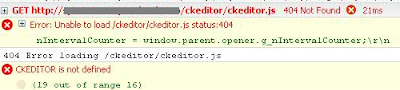
For more info on the plugin-cfg.xml file and XPages, have a look here and here.
When you are using the CKEditor (default RichText editor in 8.5.2), remember to edit your plugin-cfg.xml to direct requests to "/ckeditor/*" to the Domino server.
This is achieved by adding a line to plugin-cfg-xml looking like this:
<Uri Name="/ckeditor/*" />
Hints that this is required include the faact that the rich text editor is not displayed and that your browser displays error messages like this:


For more info on the plugin-cfg.xml file and XPages, have a look here and here.
October 4, 2010
XPages: Edit multi-value fields in existing documents - A frustrating battle!
It's been a while since I last wrote something on here, I'm blaming it on a very busy schedule, but now there's something I would very much like to share with the rest of the XPages Community: During the last couple of months, I've been (amongst other things) working on implementing an "edit news article"/"edit user profile" feature on website I'm creating. I've previously developed a "create news article". This XPage contains the usual "heading", "lead paragraph" and "body" fields, but also some multi-value fields to select category and target audience for the news article.
The creation of these multi-value fields were fairly straight-forward, and creating news articles worked like a dream. However, trying to edit these fields on an XPage was to be a more painful experience. Changing the values and hitting the save button on the site would not have the desired effects on the saved Notes document, the multi-value fields would remain unchanged. The whole thing was getting very frustrating, but fortunately there are some explaining and helpful articles out there on the web:
The creation of these multi-value fields were fairly straight-forward, and creating news articles worked like a dream. However, trying to edit these fields on an XPage was to be a more painful experience. Changing the values and hitting the save button on the site would not have the desired effects on the saved Notes document, the multi-value fields would remain unchanged. The whole thing was getting very frustrating, but fortunately there are some explaining and helpful articles out there on the web:
- Sean Cull has created a page that demonstrates the the differences between a field's value and submitted value. Take a look here.
- IBM have written something themselves about the topic, have a look here.
- YouAtNotes.de writing about getting and setting field values and value bindings here.
I hope these links will prove to be as helpful to some of you as they were to me!
June 25, 2010
XPages: XSP Unit testing framework - anyone tried it?
After being "brainwashed" by Uncle Bob and Roy Osherove for 3 days about test driven development, I came back to work eager to try to use some of these techniques in my daily work with XPages. A quick Google search pointed me in the direction of XSP Unit, a "simple framework for xUnit style unit testing of Javascript in XPages Applications" developed by Lorcan McDonald.
My first impression is positive, but I was wondering if anyone else in the XPages community are currently using this framework?
What are your experiences?
Is it worth the hassle to set it up and start using it?
My first impression is positive, but I was wondering if anyone else in the XPages community are currently using this framework?
What are your experiences?
Is it worth the hassle to set it up and start using it?
June 14, 2010
XPages: Default Value for Repeat Limit in Repeater Control Equals 30 ?
Last week, I stumbled upon a mysterious bug in XPages. I've created quite a few pages and custom controllers with repeater controls during the last months, but never seen this before:
When I didn't specify a repeat limit for the control, I would only get the first 30 entries from the data source!
I've developed the habit of not setting the repeat limit when I don't need it, believeing that it would provide me with all the entries from the data source. Checking the provided documentation in the Domino Designer comfirmed my thoughts:
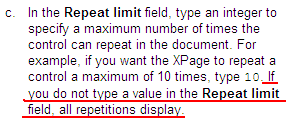
Has anyone else experienced this bug? Or is there another way to limit the repeat control, that I might have done unintentionally?
For most cases, the work around is quite easy, just set the repeat limit field to some high value that you (probably?) will never exceed, but in some cases you might not know in what range the number of view entries will be when your application has been in use for a while...
When I didn't specify a repeat limit for the control, I would only get the first 30 entries from the data source!
I've developed the habit of not setting the repeat limit when I don't need it, believeing that it would provide me with all the entries from the data source. Checking the provided documentation in the Domino Designer comfirmed my thoughts:

Has anyone else experienced this bug? Or is there another way to limit the repeat control, that I might have done unintentionally?
For most cases, the work around is quite easy, just set the repeat limit field to some high value that you (probably?) will never exceed, but in some cases you might not know in what range the number of view entries will be when your application has been in use for a while...
June 8, 2010
XPages: Modifying Button Text in File Upload Control?
I'm currently working on create a page, using XPages, where the users amongst other things are able to upload files. Simply dragging and dropping a File Upload Control onto the page works fine, but I would also like to modify the text on the browse button that is automatically provided by the Dojo framework.
It seems to me that the text on the button is set to the default "browse text" of the system. On other buttons on the page, e.g. the submit button, I am able to set the label of the button (see picture below, which is then displayed as the button's text. This does not work for the browse button...

Does anybody know what I need to do to be able to set the text of the file upload control button to whatever string I want to?
It seems to me that the text on the button is set to the default "browse text" of the system. On other buttons on the page, e.g. the submit button, I am able to set the label of the button (see picture below, which is then displayed as the button's text. This does not work for the browse button...

Does anybody know what I need to do to be able to set the text of the file upload control button to whatever string I want to?
May 25, 2010
Trouble Saving a Notes Document from Web
I'm currently working on re-implementing the customer's intranet site. As part of this work, I'm at the moment developing a page that let the users publish news to the site.
Reading different blogs around the web, the way to do is is fairly straight forward:
This work was completed in a few minutes and I successfully tested the page in Firefox. I was about to run around the office in celebration, when I reminded myself to verify that it works in Internet Explorer 7 (the browser of choice at the customer's office) as well... That's when the trouble started!
Clicking the save button in IE7, the only thing happening is that an error message is displayed:
 (The id of my save button is "view:_id1:button1")
As I click the save button in Firefox, I can see through Firebug that the DOM is actually changed as the onClick event of the button is fired. The code snippet now looks like this:

As far as I can see (through Firebug Lite), the same changes are not made in Internet Explorer 7. I have just started experimenting with this part of XPages (submitting/editing documents from Web), but I am assuming that this is what causes the trouble, as the Xpage does not know what part of the page to submit to the server side.
Are there anyone else out there experiencing the same problems?
I have made attempts to dive into the XPages event handling, but I have yet to get to grips with it.
Unfortunately, I have not been able to test this page in other browsers yet. Due to security issues, I am developing the XPages application on a computer provided by the customer, with insufficient rights to install additional software.
UPDATE:
The source code that creates the problem:
Reading different blogs around the web, the way to do is is fairly straight forward:
- Add a data source to your xpage, select a form, and set it to create a document when the page is loaded
- Add some fields and bind them to fields in your form.
- Add a button at the bottom of your page, and add a Simple Action event ("Save Document") to it.
This work was completed in a few minutes and I successfully tested the page in Firefox. I was about to run around the office in celebration, when I reminded myself to verify that it works in Internet Explorer 7 (the browser of choice at the customer's office) as well... That's when the trouble started!
Clicking the save button in IE7, the only thing happening is that an error message is displayed:
'document.forms[...].$$xspsubmitid' is null or not an object'Inspecting the source code of the Xpage, there are a few interesting parts. When creating an Xpage with a submit/save button, the following HTML is automagically created and included in your page:

As I click the save button in Firefox, I can see through Firebug that the DOM is actually changed as the onClick event of the button is fired. The code snippet now looks like this:
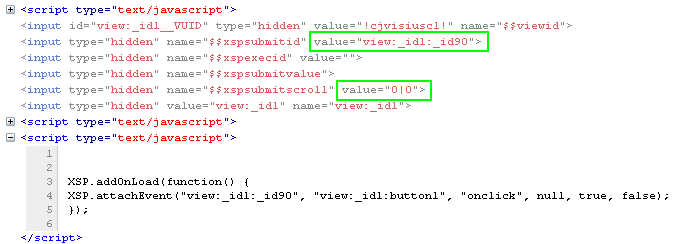
As far as I can see (through Firebug Lite), the same changes are not made in Internet Explorer 7. I have just started experimenting with this part of XPages (submitting/editing documents from Web), but I am assuming that this is what causes the trouble, as the Xpage does not know what part of the page to submit to the server side.
Are there anyone else out there experiencing the same problems?
I have made attempts to dive into the XPages event handling, but I have yet to get to grips with it.
Unfortunately, I have not been able to test this page in other browsers yet. Due to security issues, I am developing the XPages application on a computer provided by the customer, with insufficient rights to install additional software.
UPDATE:
The source code that creates the problem:
XPAGE SOURCE CODE
<?xml version="1.0" encoding="UTF-8"?>
<xp:view xmlns:xp="http://www.ibm.com/xsp/core" xmlns:xc="http://www.ibm.com/xsp/custom">
<xp:this.resources>
// Removed included js and css files
</xp:this.resources>
<xp:this.data>
<xp:dominoDocument var="newsDoc" formName="NEWS">
</xp:dominoDocument>
</xp:this.data>
<xc:global_linkjs />
<div class="main xpNyhet">
<div class="mainInner">
<div class="content">
<div class="page">
<div class="pageCenter">
<div class="pageContent">
// Removed code to generate entry fields and bind them to fields in the document (by drag-and-drop from Data palette)
<xp:button value="Lagre dokument"
id="button1" save="true" execMode="complete">
<xp:eventHandler event="onclick"
save="true" submit="true" immediate="false" refreshMode="complete">
<xp:this.action>
<xp:actionGroup>
<xp:saveDocument></xp:saveDocument>
<xp:openPage>
<xp:this.name><![CDATA[#{javascript:var mid = new CGIVariables().getURLParam("mid");
if (mid) {
return "/forsideSpin.xsp?mid=" + mid + "&login";
} else {
return "/forsideSpin.xsp?login";
}}]]>
</xp:this.name>
</xp:openPage>
</xp:actionGroup>
</xp:this.action>
</xp:eventHandler>
</xp:button>
</div>
</div>
</div>
</div>
</div>
</div>
</xp:view>
--------------------------------------------------------------------------------------------------------------------------------------------------------------------------------------
HTML SOURCE CODE (from IE7)
<!DOCTYPE HTML PUBLIC "-//W3C//DTD HTML 4.01 Transitional//EN" "http://www.w3.org/TR/html4/loose.dtd">
<html lang="no">
<head>
// Removed content here
</head>
<body class="xspView tundra">
<form id="view:_id1" method="post" action="/weblink/FELLES/spinlokalnyheter.nsf/lagNyhet.xsp?mid=spin&login" class="xspForm" enctype="multipart/form-data">
<div class="content">
<div class="page">
<div class="pageCenter">
<div class="pageContent">
// Removed content here. Entry fields bound to fields in the doucment form.
<button id="view:_id1:button1" class="xspButtonSubmit" type="button" name="view:_id1:button1">Save document</button>
</div>
</div>
</div>
</div>
<input type="hidden" name="$$viewid" id="view:_id1__VUID" value="!cjwesc81oc!">
<input type="hidden" name="$$xspsubmitid">
<input type="hidden" name="$$xspexecid">
<input type="hidden" name="$$xspsubmitvalue">
<input type="hidden" name="$$xspsubmitscroll">
<input type="hidden" name="view:_id1" value="view:_id1">
<script type="text/javascript">
function clearFormHiddenParams_view__id1(curFormName) {
var curForm = document.forms[curFormName];
}
</script>
</form>
<script type="text/javascript">
XSP.addOnLoad(function() {
XSP.attachEvent("view:_id1:_id90", "view:_id1:button1", "onclick", null, true, false);
});
</script>
</body>
</html>
April 26, 2010
XPages and Caching
Xpages provides you with the functionality to store key/value-pairs in different scopes: request, session, application and view. However, there is no expiry date on this data, at least by default.
I stumbled upon two great blog posts on how to implement a simple, but in many cases more than good enough, caching technique for your XPages variables.
Take a look at Matt White's blog entry or YouAtNotes' blog entry to get all the details!
Also, the rest of their blogs are strongly recommended for excellent XPages tips!
I stumbled upon two great blog posts on how to implement a simple, but in many cases more than good enough, caching technique for your XPages variables.
Take a look at Matt White's blog entry or YouAtNotes' blog entry to get all the details!
Also, the rest of their blogs are strongly recommended for excellent XPages tips!
April 16, 2010
Extending the XPages Type Ahead Functionality
Xpages comes with a built-in type-ahead functionality for text input fields for your forms. This functionality is working OK straight out of the box, as long as you don't want to do anything too advanced...
I started off by putting up the basic structure: add an Edit Box from the "Core Controls" menu in the Domino Designer and enabling the type ahead functionality from its property panel. By now, switching to the source view in the Designer, you should see something like this:

Left click somewhere within the xp:typeAhead tags to see all the type Ahead properties in your properties panel. I've ended up with these settings:
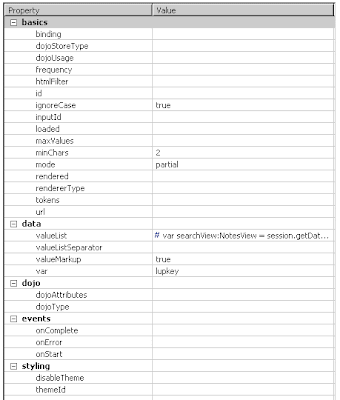 The important attributes are "minChars", "partial", "valueList", "valueMarkup" and "var". As long as you do your own computations (which we will discuss in a minute) to find the type ahead suggestions, the setting for "ignoreCase" doesn't matter.
The code I ended up with in the "valueList" property is shown in its full below:
OK, so I want you to pay special attention to a few things...
There are several other blog entries out there that explain the basic and some more extended usage of the Type Ahead feature:keithstric.com, Lotus.com, DontPanic82. These entries (and others) all provide great information to get you started, but they didn't quite suit all my needs...
My task was as follows:- Develop a type ahead functionality for a company's employee search
- Large number of employees (have to do a work-around for Notes' @DbLookup 64Kb limit).
- You should get suggestions based on both first names and last names
- Typing "and" in the input field should provide both "Andy Johnson", "John Anderson" and "Randy Thompson" as suggestions. (the built-in feature would only do a search for "and" or "and*", not "*and*")
I started off by putting up the basic structure: add an Edit Box from the "Core Controls" menu in the Domino Designer and enabling the type ahead functionality from its property panel. By now, switching to the source view in the Designer, you should see something like this:

Left click somewhere within the xp:typeAhead tags to see all the type Ahead properties in your properties panel. I've ended up with these settings:

- minChars: the minimum number of characters that need to be in the input field to start looking for suggestions. I've set this property to 2, as keeping it at 1 (the default) will get me too many suggestions, while setting it to 3 or more kind of defeats the purpose of the type ahead. Set it to whatever suits your task :-)
- mode: The AJAX request mode. Set it to "partial" to avoid a full page reload.
- valueMarkup: setting this field to "true" tells the Designer that you will be taking care of creating the markup for the list of suggestions.
- var: the name of the variable that contains the string entered in the input field. This variable is then accesible when we will create our suggestion list, which brings us to...
- valueList: Now, this is where the magic happens! This is where you enter your code, so that you get the type ahead suggestions you want presented in the way you want it.
The code I ended up with in the "valueList" property is shown in its full below:
//Getting the view containing a document for each of the employees
var searchView:NotesView = session.getDatabase("","myemployees.nsf").getView("employeesTypeAhead");
// Creating a Lotus Notes search query. Notice the reference to lupkey!
var query = "(FIELD LastName CONTAINS *" + lupkey +"* OR FIELD FirstName CONTAINS *" + lupkey +"*)";
// Creating an array to store hits in
var searchOutput:Array = ["å","åå"];
// Doing the actual search
var hits = searchView.FTSearch(query);
var entries = searchView.getAllEntries();
var entry = entries.getFirstEntry();
//Sort the array manually, since Notes doesn't want to sort them alphabetically
for (i=0; i<hits; i++) {
searchOutput.push(entry.getColumnValues()[0]);
entry = entries.getNextEntry();
}
searchOutput.sort();
// Build the resulting output HTML code
var result = "<ul><li><span class='informal'>Suggestions:</span></li>";
var limit = Math.min(hits,20);
for (j=0; j<limit; j++) {
var name = searchOutput[j].toString();
var start = name.indexOfIgnoreCase(lupkey)
var stop = start + lupkey.length;
//Make the matching part of the name bold
name = name.insert("</b>",stop).insert("<b>",start);
result += "<li>" + name + "</li>";
}
result += "</ul>";
return result;
OK, so I want you to pay special attention to a few things...
- For the search to work, you should make sure that the documents in the view have fields named "LastName" and "FirstName", or change the code to your needs.
- By adding a "*" at the start and end of the lupkey variable in my search query, I'm able to get a partial match on any substring in the field values.The built-in feature will only allow partial match from the start of the field value (i.e. searching for "lupkey*").
- When you do the FTSearch, the entries in the view will automatically be sorted by their search score (some mysterious score calculated by Notes showing how "relevant" the entry is for your query). Since I wanted my results sorted alphabetically, I had to take care of that myself.
- The return value of the script must be an unordered list (see here for further information)
Subscribe to:
Posts (Atom)


