After being "brainwashed" by Uncle Bob and Roy Osherove for 3 days about test driven development, I came back to work eager to try to use some of these techniques in my daily work with XPages. A quick Google search pointed me in the direction of XSP Unit, a "simple framework for xUnit style unit testing of Javascript in XPages Applications" developed by Lorcan McDonald.
My first impression is positive, but I was wondering if anyone else in the XPages community are currently using this framework?
What are your experiences?
Is it worth the hassle to set it up and start using it?
June 25, 2010
June 14, 2010
XPages: Default Value for Repeat Limit in Repeater Control Equals 30 ?
Last week, I stumbled upon a mysterious bug in XPages. I've created quite a few pages and custom controllers with repeater controls during the last months, but never seen this before:
When I didn't specify a repeat limit for the control, I would only get the first 30 entries from the data source!
I've developed the habit of not setting the repeat limit when I don't need it, believeing that it would provide me with all the entries from the data source. Checking the provided documentation in the Domino Designer comfirmed my thoughts:
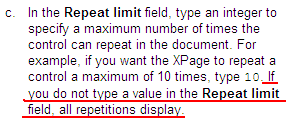
Has anyone else experienced this bug? Or is there another way to limit the repeat control, that I might have done unintentionally?
For most cases, the work around is quite easy, just set the repeat limit field to some high value that you (probably?) will never exceed, but in some cases you might not know in what range the number of view entries will be when your application has been in use for a while...
When I didn't specify a repeat limit for the control, I would only get the first 30 entries from the data source!
I've developed the habit of not setting the repeat limit when I don't need it, believeing that it would provide me with all the entries from the data source. Checking the provided documentation in the Domino Designer comfirmed my thoughts:

Has anyone else experienced this bug? Or is there another way to limit the repeat control, that I might have done unintentionally?
For most cases, the work around is quite easy, just set the repeat limit field to some high value that you (probably?) will never exceed, but in some cases you might not know in what range the number of view entries will be when your application has been in use for a while...

June 8, 2010
XPages: Modifying Button Text in File Upload Control?
I'm currently working on create a page, using XPages, where the users amongst other things are able to upload files. Simply dragging and dropping a File Upload Control onto the page works fine, but I would also like to modify the text on the browse button that is automatically provided by the Dojo framework.
It seems to me that the text on the button is set to the default "browse text" of the system. On other buttons on the page, e.g. the submit button, I am able to set the label of the button (see picture below, which is then displayed as the button's text. This does not work for the browse button...

Does anybody know what I need to do to be able to set the text of the file upload control button to whatever string I want to?
It seems to me that the text on the button is set to the default "browse text" of the system. On other buttons on the page, e.g. the submit button, I am able to set the label of the button (see picture below, which is then displayed as the button's text. This does not work for the browse button...

Does anybody know what I need to do to be able to set the text of the file upload control button to whatever string I want to?
May 25, 2010
Trouble Saving a Notes Document from Web
I'm currently working on re-implementing the customer's intranet site. As part of this work, I'm at the moment developing a page that let the users publish news to the site.
Reading different blogs around the web, the way to do is is fairly straight forward:
This work was completed in a few minutes and I successfully tested the page in Firefox. I was about to run around the office in celebration, when I reminded myself to verify that it works in Internet Explorer 7 (the browser of choice at the customer's office) as well... That's when the trouble started!
Clicking the save button in IE7, the only thing happening is that an error message is displayed:
 (The id of my save button is "view:_id1:button1")
As I click the save button in Firefox, I can see through Firebug that the DOM is actually changed as the onClick event of the button is fired. The code snippet now looks like this:

As far as I can see (through Firebug Lite), the same changes are not made in Internet Explorer 7. I have just started experimenting with this part of XPages (submitting/editing documents from Web), but I am assuming that this is what causes the trouble, as the Xpage does not know what part of the page to submit to the server side.
Are there anyone else out there experiencing the same problems?
I have made attempts to dive into the XPages event handling, but I have yet to get to grips with it.
Unfortunately, I have not been able to test this page in other browsers yet. Due to security issues, I am developing the XPages application on a computer provided by the customer, with insufficient rights to install additional software.
UPDATE:
The source code that creates the problem:
Reading different blogs around the web, the way to do is is fairly straight forward:
- Add a data source to your xpage, select a form, and set it to create a document when the page is loaded
- Add some fields and bind them to fields in your form.
- Add a button at the bottom of your page, and add a Simple Action event ("Save Document") to it.
This work was completed in a few minutes and I successfully tested the page in Firefox. I was about to run around the office in celebration, when I reminded myself to verify that it works in Internet Explorer 7 (the browser of choice at the customer's office) as well... That's when the trouble started!
Clicking the save button in IE7, the only thing happening is that an error message is displayed:
'document.forms[...].$$xspsubmitid' is null or not an object'Inspecting the source code of the Xpage, there are a few interesting parts. When creating an Xpage with a submit/save button, the following HTML is automagically created and included in your page:

As I click the save button in Firefox, I can see through Firebug that the DOM is actually changed as the onClick event of the button is fired. The code snippet now looks like this:
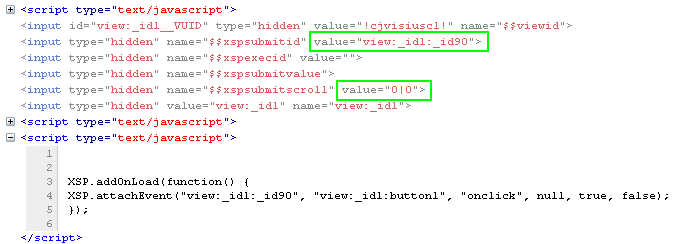
As far as I can see (through Firebug Lite), the same changes are not made in Internet Explorer 7. I have just started experimenting with this part of XPages (submitting/editing documents from Web), but I am assuming that this is what causes the trouble, as the Xpage does not know what part of the page to submit to the server side.
Are there anyone else out there experiencing the same problems?
I have made attempts to dive into the XPages event handling, but I have yet to get to grips with it.
Unfortunately, I have not been able to test this page in other browsers yet. Due to security issues, I am developing the XPages application on a computer provided by the customer, with insufficient rights to install additional software.
UPDATE:
The source code that creates the problem:
XPAGE SOURCE CODE
<?xml version="1.0" encoding="UTF-8"?>
<xp:view xmlns:xp="http://www.ibm.com/xsp/core" xmlns:xc="http://www.ibm.com/xsp/custom">
<xp:this.resources>
// Removed included js and css files
</xp:this.resources>
<xp:this.data>
<xp:dominoDocument var="newsDoc" formName="NEWS">
</xp:dominoDocument>
</xp:this.data>
<xc:global_linkjs />
<div class="main xpNyhet">
<div class="mainInner">
<div class="content">
<div class="page">
<div class="pageCenter">
<div class="pageContent">
// Removed code to generate entry fields and bind them to fields in the document (by drag-and-drop from Data palette)
<xp:button value="Lagre dokument"
id="button1" save="true" execMode="complete">
<xp:eventHandler event="onclick"
save="true" submit="true" immediate="false" refreshMode="complete">
<xp:this.action>
<xp:actionGroup>
<xp:saveDocument></xp:saveDocument>
<xp:openPage>
<xp:this.name><![CDATA[#{javascript:var mid = new CGIVariables().getURLParam("mid");
if (mid) {
return "/forsideSpin.xsp?mid=" + mid + "&login";
} else {
return "/forsideSpin.xsp?login";
}}]]>
</xp:this.name>
</xp:openPage>
</xp:actionGroup>
</xp:this.action>
</xp:eventHandler>
</xp:button>
</div>
</div>
</div>
</div>
</div>
</div>
</xp:view>
--------------------------------------------------------------------------------------------------------------------------------------------------------------------------------------
HTML SOURCE CODE (from IE7)
<!DOCTYPE HTML PUBLIC "-//W3C//DTD HTML 4.01 Transitional//EN" "http://www.w3.org/TR/html4/loose.dtd">
<html lang="no">
<head>
// Removed content here
</head>
<body class="xspView tundra">
<form id="view:_id1" method="post" action="/weblink/FELLES/spinlokalnyheter.nsf/lagNyhet.xsp?mid=spin&login" class="xspForm" enctype="multipart/form-data">
<div class="content">
<div class="page">
<div class="pageCenter">
<div class="pageContent">
// Removed content here. Entry fields bound to fields in the doucment form.
<button id="view:_id1:button1" class="xspButtonSubmit" type="button" name="view:_id1:button1">Save document</button>
</div>
</div>
</div>
</div>
<input type="hidden" name="$$viewid" id="view:_id1__VUID" value="!cjwesc81oc!">
<input type="hidden" name="$$xspsubmitid">
<input type="hidden" name="$$xspexecid">
<input type="hidden" name="$$xspsubmitvalue">
<input type="hidden" name="$$xspsubmitscroll">
<input type="hidden" name="view:_id1" value="view:_id1">
<script type="text/javascript">
function clearFormHiddenParams_view__id1(curFormName) {
var curForm = document.forms[curFormName];
}
</script>
</form>
<script type="text/javascript">
XSP.addOnLoad(function() {
XSP.attachEvent("view:_id1:_id90", "view:_id1:button1", "onclick", null, true, false);
});
</script>
</body>
</html>
April 26, 2010
XPages and Caching
Xpages provides you with the functionality to store key/value-pairs in different scopes: request, session, application and view. However, there is no expiry date on this data, at least by default.
I stumbled upon two great blog posts on how to implement a simple, but in many cases more than good enough, caching technique for your XPages variables.
Take a look at Matt White's blog entry or YouAtNotes' blog entry to get all the details!
Also, the rest of their blogs are strongly recommended for excellent XPages tips!
I stumbled upon two great blog posts on how to implement a simple, but in many cases more than good enough, caching technique for your XPages variables.
Take a look at Matt White's blog entry or YouAtNotes' blog entry to get all the details!
Also, the rest of their blogs are strongly recommended for excellent XPages tips!
Subscribe to:
Posts (Atom)


